
Detect and Classify
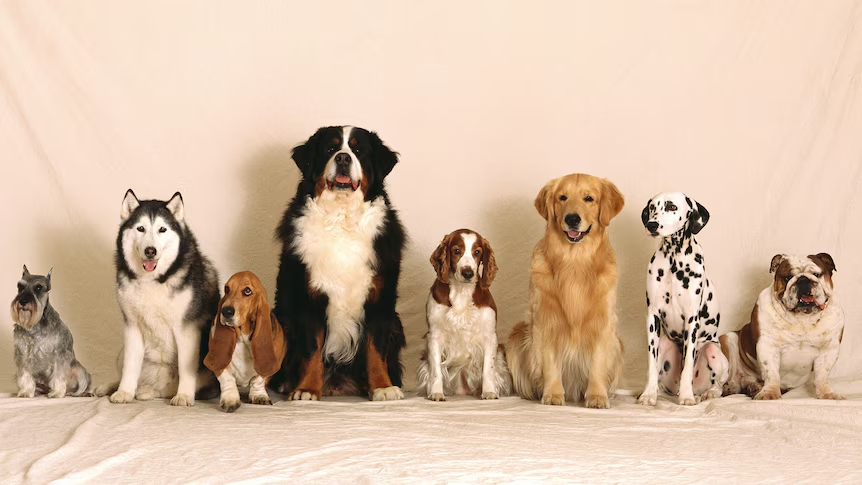
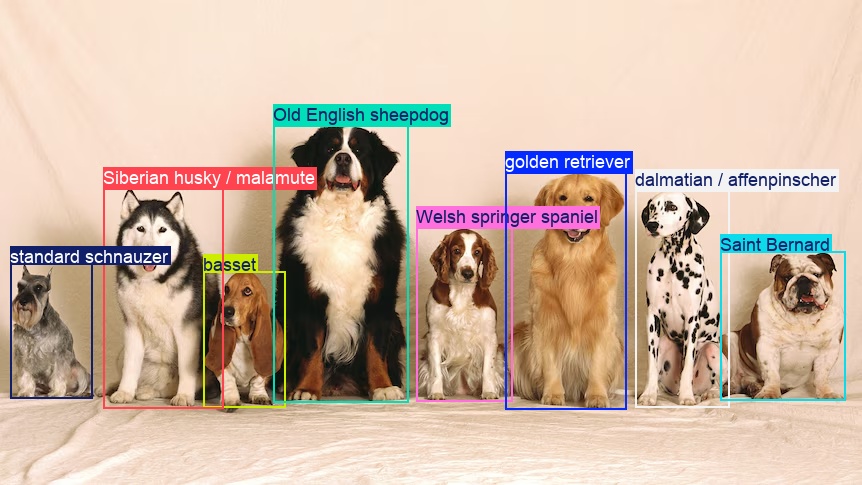
Detect and classify is a common multi-model workflow. Object detection localizes the targets in an image, then image classification categorizes each target using its cropped region. Together, these stages assign more specific labels to individual objects. This tutorial builds the workflow step by step, keeping each prediction paired with its original detection.
This tutorial uses dog breed classification as a worked example. The
COCO-trained YOLO detector has a single dog class, while the ImageNet-trained
YOLO classifier distinguishes 118 domestic dog breed classes (ImageNet class list). The same pipeline structure
applies to other object categories and classification tasks with suitable
checkpoints and class selections.
Before you begin, follow the Installation instructions. Run the Python snippets in order in the same script or notebook.
| Before | After |
|---|---|
 |
 |
Detect objects
The first step is to localize the targets we want to classify. Here we are using YOLO in
detection mode (yolo26n.pt checkpoint) to find objects and their bounding boxes.
from ml_pipes.core import Pipeline
from ml_pipes.standard import Select
from ml_pipes.ultralytics import yolo


pipeline = Pipeline(
    [
        yolo.Predict(model="yolo26n.pt", conf=0.25, iou=0.7, imgsz=960),
        Select(0),
    ],
    auto_validate=True,
)
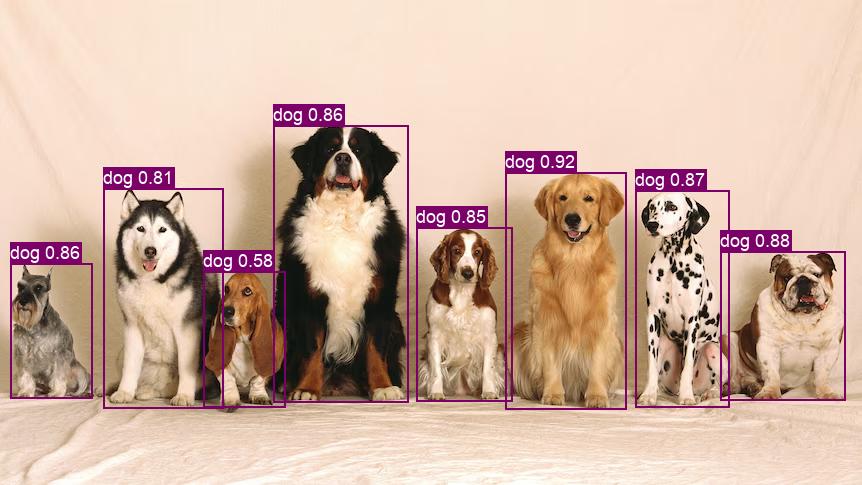
The detector returns object categories and boxes. In this sample it finds
all eight dogs, but its dog label does not identify a breed. The next stage
selects the category we want to classify.
Filter detections
Both detection and classification process an entire input image. In this pipeline, however, we run classification separately for each detection. Filtering out unwanted objects avoids unnecessary classifier calls, saving time and resources.
For dog breed classification, we keep only detections labeled dog.
import numpy as np
from ultralytics.engine.results import Results

from ml_pipes.operator import Operator


@Operator
class FilterResults:
    """Keep exact class-name matches as a native Results object."""

    def __init__(self, class_name: str) -> None:
        self.class_name = class_name

    def __call__(self, result: Results) -> Results:
        if self.class_name not in result.names.values():
            raise ValueError(f"Detector has no class named {self.class_name!r}.")
        if result.boxes is None:
            empty = result.new()
            empty.update(boxes=np.empty((0, 6), dtype=np.float32))
            return empty
        indices = [
            index
            for index, class_id in enumerate(result.boxes.cls.tolist())
            if result.names[int(class_id)] == self.class_name
        ]
        return result[indices]


pipeline = Pipeline(
    [
        yolo.Predict(model="yolo26n.pt", conf=0.25, iou=0.7, imgsz=960),
        Select(0),
        FilterResults("dog"),
    ],
    auto_validate=True,
)
Crop selected detections
A classifier assigns categories to the image it receives. A crop gives it a focused view of one target, instead of a scene containing several objects and background.
A small amount of padding can preserve details near the box edges and some surrounding context when a detection box is too tight.
The current example uses gain=1.0 and pad=0, so it adds no padding. Increase these when your
targets need more context, but keep padding small when detections are
densely packed to avoid including neighboring objects in the crop.
import warnings

import numpy.typing as npt
from ultralytics.utils.plotting import save_one_box

ImageArray = npt.NDArray[np.uint8]


@Operator
class CropResults:
    """Return aligned detections and in-memory crops using Ultralytics."""

    def __init__(self, *, save: bool = False, BGR: bool = True, gain: float = 1.0, pad: int = 0) -> None:
        self.save = save
        self.BGR = BGR
        self.gain = gain
        self.pad = pad

    def __call__(self, result: Results) -> tuple[Results, list[ImageArray]]:
        indices, crops = [], []
        for index, box in enumerate(result.boxes.cpu().numpy()):
            if not np.isfinite(box.xyxy).all():
                warnings.warn(f"Skipping detection {index}: non-finite bounding box.", RuntimeWarning)
                continue
            crop = save_one_box(
                box.xyxy, result.orig_img,
                save=self.save, BGR=self.BGR, gain=self.gain, pad=self.pad,
            )
            if not crop.size:
                warnings.warn(f"Skipping detection {index}: empty bounding-box crop.", RuntimeWarning)
                continue
            indices.append(index)
            crops.append(crop.copy())
        return result[indices], crops


pipeline = Pipeline(
    [
        yolo.Predict(model="yolo26n.pt", conf=0.25, iou=0.7, imgsz=960),
        Select(0),
        FilterResults("dog"),
        CropResults(),
    ],
    auto_validate=True,
)
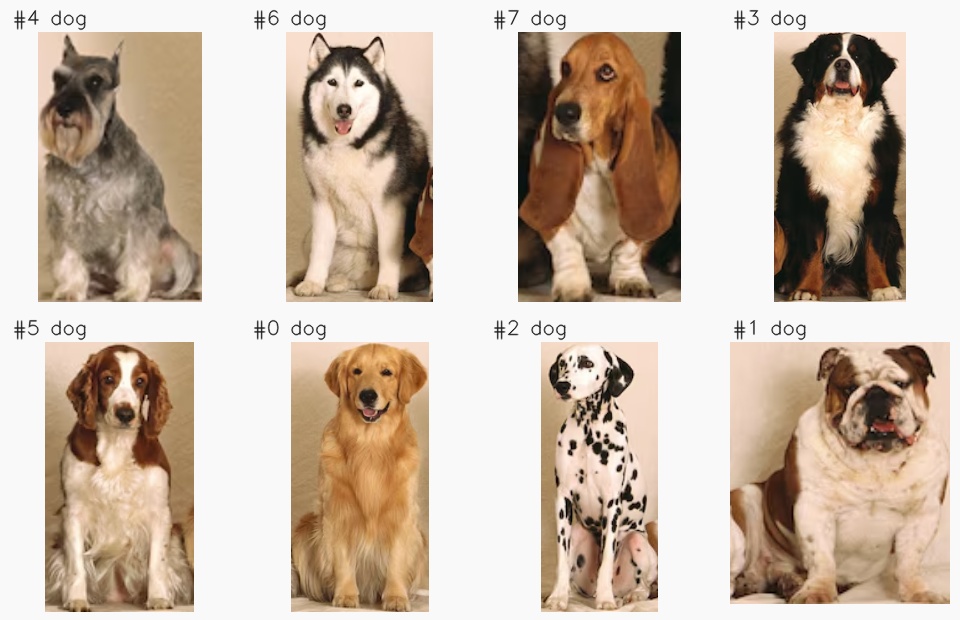
These are the eight crops, arranged left to right; their numbers identify the detections, not their position in the image.
Classify objects
Use a second model to assign a more specific category to each selected object. Scatter/Gather applies the classifier to each crop and collects the predictions in the same order, keeping them aligned with the detections.
from ml_pipes.standard import Gather, Pick, Scatter, Store


pipeline = Pipeline(
    [
        yolo.Predict(model="yolo26n.pt", conf=0.25, iou=0.7, imgsz=960),
        Select(0),
        FilterResults("dog"),
        CropResults(),
        Store("detections", source=0),
        Pick(1),  # Pass only the crops to the classifier.
        Scatter(max_concurrency=1),
        yolo.Predict(model="yolo26n-cls.pt", imgsz=224),
        Select(0),
        Gather(),
    ],
    auto_validate=True,
)
Bonus: Filter classification classes
A general-purpose classifier can predict many categories unrelated to your
task. Filter its output to consider only the classes you want. Here we keep
ImageNet domestic dog breed IDs 151 through 268, excluding wild canids
(ImageNet class mapping).
This selects candidate labels after inference, not a different model. Keep
the original scores without renormalizing: restricting the label set does
not make the classifier more certain. Omit FilterClasses or pass None
to consider all classes instead.
# Candidate classes for this example: ImageNet domestic dog breeds.
CLASSIFICATION_CLASSES = tuple(range(151, 269))


@Operator
class FilterClasses:
    """Keep candidate classification classes with their original scores."""

    def __init__(self, class_ids: tuple[int, ...] | None = None) -> None:
        if class_ids is not None and not class_ids:
            raise ValueError("Select at least one classification class ID.")
        self.class_ids = class_ids

    def __call__(self, result: Results) -> Results:
        if result.probs is None:
            raise ValueError("Classifier returned no probabilities; use a classification (-cls) checkpoint.")
        class_ids = tuple(result.names) if self.class_ids is None else self.class_ids
        if not class_ids or any(
            class_id not in result.names or not 0 <= class_id < len(result.probs.data)
            for class_id in class_ids
        ):
            raise ValueError("Classifier lacks the requested class IDs; choose IDs that match its checkpoint.")
        filtered = result.new()
        # Native classification IDs index the score vector, so remap names too.
        filtered.names = {index: result.names[class_id] for index, class_id in enumerate(class_ids)}
        filtered.update(probs=result.probs.data[list(class_ids)])
        return filtered


pipeline = Pipeline(
    [
        yolo.Predict(model="yolo26n.pt", conf=0.25, iou=0.7, imgsz=960),
        Select(0),
        FilterResults("dog"),
        CropResults(),
        Store("detections", source=0),
        Pick(1),  # Pass only the crops to the classifier.
        Scatter(max_concurrency=1),
        yolo.Predict(model="yolo26n-cls.pt", imgsz=224),
        Select(0),
        FilterClasses(CLASSIFICATION_CLASSES),
        Gather(),
    ],
    auto_validate=True,
)
Show predictions
Bring back the detections to label each object on the original image with
its highest-scoring classification. When that score is below 50%, also
show the second class as first / second to make uncertainty visible.
These are classification scores, not detection confidence.
The pipeline draws the labels on the original image and saves the result
to annotated.jpg:
from ml_pipes.standard import Recall
from ml_pipes.ultralytics import results


@Operator
class LabelDetections:
    """Build a display-only Results with a different classification label per box."""

    def __call__(self, detections: Results, classifications: list[Results]) -> Results:
        if len(detections.boxes) != len(classifications):
            raise ValueError("Each detection must have one classification result.")
        # Native Plot looks up names[box.cls]. Give every box its own display ID;
        # changing names[dog_id] alone would give all dogs the same breed label.
        boxes = detections.boxes.cpu().numpy().data[:, [0, 1, 2, 3, -2, -1]].copy()
        boxes[:, -1] = np.arange(len(boxes))
        labeled = detections.new()
        labeled.names = {
            index: self._classification_label(result)
            for index, result in enumerate(classifications)
        }
        labeled.update(boxes=boxes)
        return labeled

    @staticmethod
    def _classification_label(result: Results) -> str:
        """Show a runner-up only when the highest classification score is below 50%."""
        count = 2 if float(result.probs.top1conf) < 0.5 else 1
        return " / ".join(result.names[class_id].replace('_', ' ') for class_id in result.probs.top5[:count])


pipeline = Pipeline(
    [
        yolo.Predict(model="yolo26n.pt", conf=0.25, iou=0.7, imgsz=960),
        Select(0),
        FilterResults("dog"),
        CropResults(),
        Store("detections", source=0),
        Pick(1),  # Pass only the crops to the classifier.
        Scatter(max_concurrency=1),
        yolo.Predict(model="yolo26n-cls.pt", imgsz=224),
        Select(0),
        FilterClasses(CLASSIFICATION_CLASSES),
        Gather(),
        Recall("detections", prepend=True),
        LabelDetections(),
        results.Plot(
            conf=False, line_width=2, pil=True, font_size=18,
            save=True, filename="annotated.jpg",
        ),
    ],
    auto_validate=True,
)
Run it on an image
Save the sample image as dogs.png
next to your script, or use your own image path. Run the completed pipeline;
its Plot operator saves annotated.jpg:
import cv2

image = cv2.imread("dogs.png")
if image is None:
    raise RuntimeError("Could not load dogs.png")

pipeline(image)
With no matching detections, the classifier is skipped and the saved image has no annotations.
Run the example
To run the complete example script instead, clone the repository, then run these commands from its root directory:
python examples/run_detect_and_classify.py
python examples/run_detect_and_classify.py --source path/to/dogs.jpg --show
The default input is the eight-dog image included with this tutorial. The
annotated image is saved to
examples/.example_assets/detect-and-classify/annotated.jpg.
Use --output-dir to choose another destination.
For a different detector category or classifier, set --class-name,
--cls-model, and --classification-classes to matching labels and class IDs.
The classifier can only predict categories present in its checkpoint.
See run_detect_and_classify.py
for all command-line options.